To collect online payments for an event, use registration software with payment built in, connect it to your bank account, set your pricing and payment options, turn on automatic confirmations and receipts, and watch transactions once registration opens. Attendees register and pay in one step, and you skip the manual tracking.
Why Does an Efficient Payment System Matter for Events?
- Fewer drop-offs: a slow or confusing checkout makes people abandon registration.
- Better attendee experience: attendees pay the way they prefer.
- Real-time tracking: you see sales and revenue as they happen.
- Security: a trusted gateway protects attendees' payment details and reduces fraud.
See your numbers
Get a personalized, no-commitment savings report.
Have a question?
Ask Regpack AI anything.
What Payment Mistakes Should Event Organizers Avoid?
- Taking only credit cards. Add debit, ACH and digital wallets so no one is turned away at checkout.
- Not tracking payments as they come in. You lose sight of who has paid and who hasn't.
- Ignoring sales tax. If your event counts as a taxable service where you are, charge the correct local rate.
- No clear refund policy. Show your refund and cancellation terms during registration, not after.
- An overcomplicated checkout. Keep forms short, and follow up on abandoned registrations.
What Features Should an Event Payment System Have?
- Quick setup that works on your event website without technical skills
- Cards, bank payments and digital wallets like Apple Pay and Google Pay
- A PCI-compliant gateway that encrypts payment data
- Early-bird, group and tiered pricing, plus discounts
- Automatic confirmation emails, receipts and invoices
How Do You Set Up Online Payments for an Event?
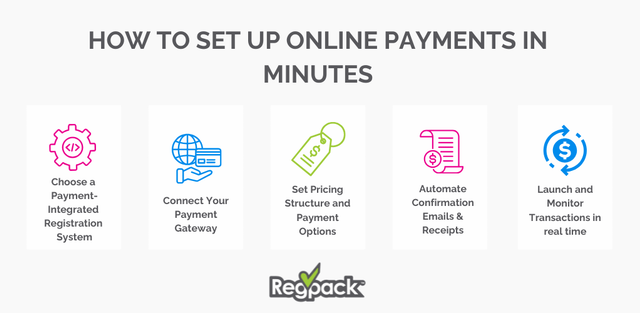
- Choose registration software with payments built in. Sign-ups and payments live in one place. See event registration software.
- Connect your payment processor to your bank account. Funds then move to you automatically.
- Set pricing and payment options. Flat fee, tiers, discounts, and installment plans for higher-priced events.
- Automate confirmations and receipts. Send event details and a payment receipt the moment someone pays.
- Launch and monitor. Watch transactions in real time so you can fix problems quickly.
How Does Regpack Handle Event Payments?
Regpack builds payments into the registration form. Attendees pay by credit card, ACH, Apple Pay, Google Pay, or Link Pay, in full, by installments or on a recurring schedule. Payments show up in real time, and custom reports track transactions and revenue. Regpack is PCI-DSS Level 2 compliant, SOC 2 Type II audited, and GDPR compliant.
"Regpack has made our convention registration more organized and user-friendly at an affordable cost. Great support and reports." Convention Operations, Summit County Fairgrounds
Frequently Asked Questions
Can attendees pay for an event in installments?
Yes, if your registration software supports payment plans. It works well for higher-priced events like conferences, retreats and trips.
Do I need to charge sales tax on event tickets?
It depends on your location and the type of event. Check your local rules or ask an accountant, and set the correct rate in your payment system.
What is the fastest way to start taking event payments online?
Use registration software with built-in payments, so you build the form and connect your bank account in one setup.