To improve recurring billing, focus on the six things that decide whether payments arrive on time: current card details, a range of payment methods, automatic retries, reminders before each charge, reporting and clear written policies. Each one cuts the time you spend chasing customers and the cash flow gaps that hurt small businesses.
1. Keep Card Information Up to Date
Out-of-date card details are one of the most common reasons a recurring payment fails. When a card expires or is replaced, the charge declines and you end up with a late payment. Many payment gateways offer an account updater that checks with the card networks for new card numbers and expiry dates before the billing date, so neither you nor the customer has to do anything.
See your numbers
Get a personalized, no-commitment savings report.
Have a question?
Ask Regpack AI anything.
2. Accept More Than One Payment Method
Cards alone are now the bare minimum. Customers expect to pay the way they prefer, whether that's a card, a bank payment or a mobile wallet, and fewer options means more drop-off. Regpack, built for trips, educational programs and activities, accepts payments by credit card, ACH (bank-to-bank), Apple Pay, Google Pay, PayPal, and Link Pay. Turn on the methods you want in your billing settings and they appear at checkout.
3. Retry Failed Payments Automatically
Many declines are "soft": low funds, a temporary hold or a generic error. A customer who is short today may have the money in two days. Automatic retries collect those payments without you or the customer stepping in. Set how many retries run, how far apart, and how long a grace period lasts before an account is paused. More in our payment failure tips.
4. Send Reminders Before Each Charge
A reminder a few days before the due date gives customers time to move funds or update a card. Keep it short and friendly, and include:
- The amount and the date it will be charged
- What the payment is for
- The payment method on file, and a link to update it
- Who to contact with questions
Most billing software can send these automatically with the customer's name, amount and due date filled in.
"The automated emails were instrumental in keeping us with Regpack." Education Program Manager, McCallum Theatre
5. Use Your Payment Data
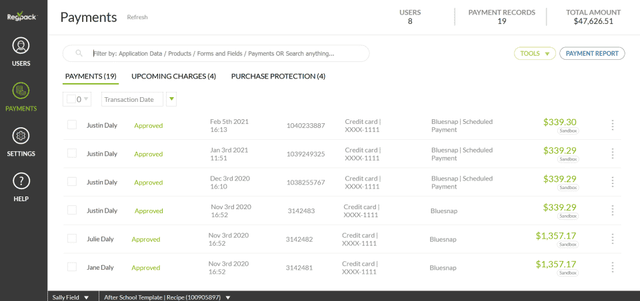
Ignoring reporting is one of the most common recurring billing mistakes. Track failed payment rate, how many failed payments are recovered, and outstanding balances, then check whether each change you make moves those numbers.
6. Publish Clear Payment Policies
Customers who find a hidden fee on their first invoice ask for refunds and cancel. Write out your schedule, late fees, refunds and cancellations, and show a short version on the checkout form with a link to the full policy. Customers who know what they're signing up for are more likely to finish sign-up and stay.
Frequently Asked Questions
What is a soft decline?
A temporary decline, such as low funds or a bank hold, that may go through if the charge is tried again later. A hard decline, like a closed or stolen card, will not.
How early should I send a payment reminder?
Three or more days before the charge is a common rule of thumb. It gives customers time to add funds or update their card.
What should recurring billing software do?
Charge on schedule, retry failed payments, send reminders and receipts, accept several payment methods and report on all of it. See Regpack's recurring billing.