To accept recurring credit card payments, choose a billing system that stores cards securely and charges them automatically, set the amount and frequency, get the customer's authorization at sign-up, and send a receipt every time a payment runs. Done well, recurring payments cut late payments and invoicing time for any business with regular customers.
What Are Recurring Payments?
Recurring payments are charges a customer authorizes once and the business collects automatically at set intervals, such as monthly tuition or an annual membership. You will also hear them called subscription payments, automatic payments, recurring billing or continuous payment authorities (CPA).
Customers like them because they never miss a due date. Businesses like them because they mean fewer late payments, fewer invoices to send and steadier cash flow.
See your numbers
Get a personalized, no-commitment savings report.
Have a question?
Ask Regpack AI anything.
Which Businesses Use Recurring Credit Card Payments?
You don't need thousands of subscribers. You need customers who pay you on a regular schedule. Common examples:
- Classes, lessons and after-school programs billed weekly or monthly
- Memberships, such as gyms, clubs and coworking spaces
- Subscriptions and subscription boxes
- Service businesses with a regular visit, such as lawn care or cleaning
- Software and online services
Why Is It Important to Get Recurring Payments Right?
A small business can't afford to lose customers over a confusing payment process. Two things go wrong most often:
- Customers feel locked in. Fix it with a receipt after every charge that shows what they paid, when and how much, and a clear way to cancel.
- Payments fail quietly. Cards expire, get replaced or run short. Choose a system that shows failed payments, retries them and sends reminders, so the money still arrives.
How Do You Set Up Recurring Card Payments?
1. Pick a recurring billing solution
Options include payment gateways, all-in-one processors, accounting software and subscription and recurring billing platforms. Whichever you choose, check for three things:
- Automation: set it up once and it charges, retries and sends receipts on its own.
- Payment choice: more than cards alone. Regpack customers can pay with credit cards, ACH, Apple Pay, Google Pay, PayPal, or Link Pay.
- Security: encryption, tokenization and PCI compliance. Regpack is PCI-DSS Level 2 compliant, SOC 2 Type II audited, and GDPR compliant.
2. Set the payment frequency and amount
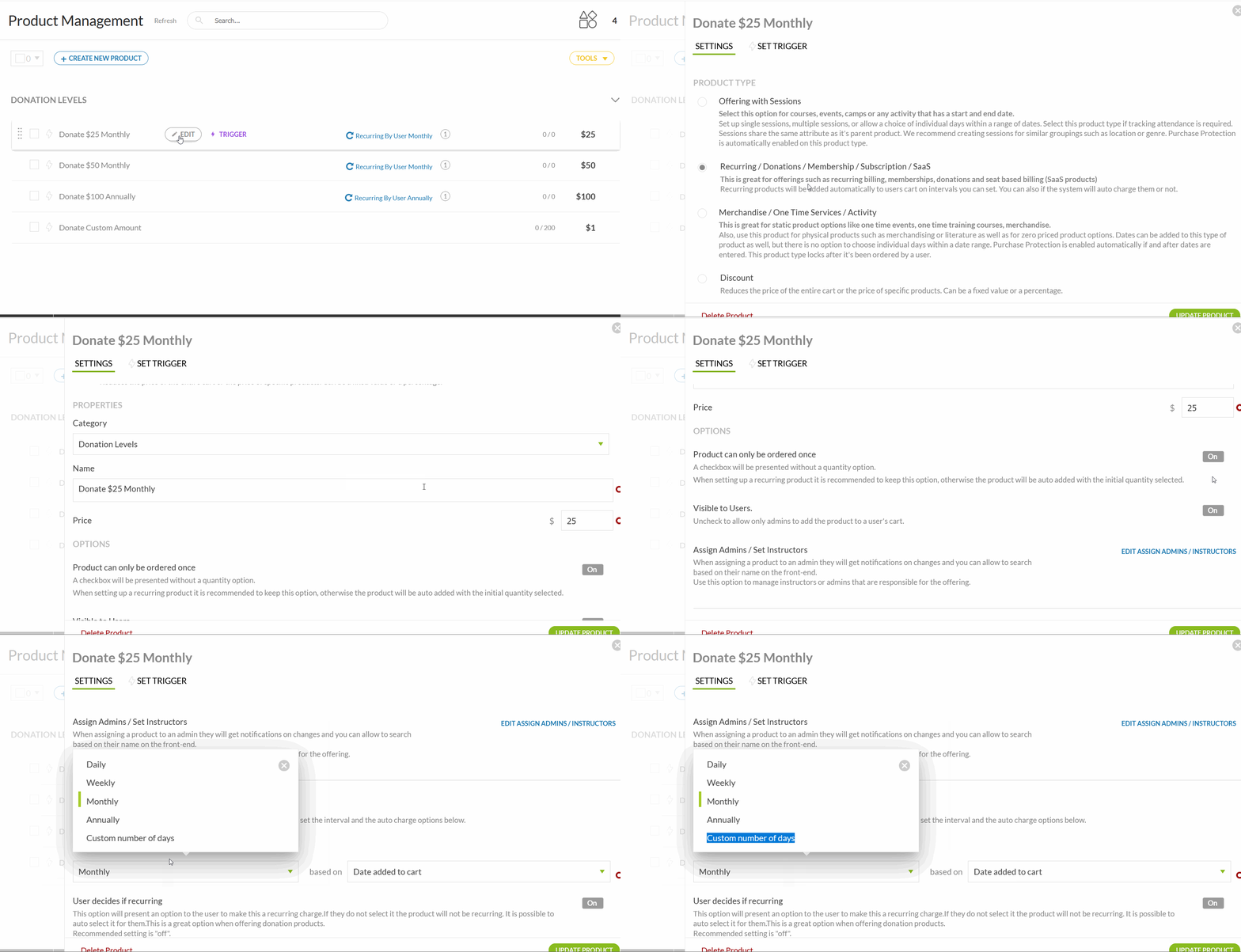
Match the frequency to how you deliver the service and what is normal in your field. Weekly classes can bill weekly; most memberships bill monthly or yearly. In Regpack you can choose daily, weekly, monthly or annual billing, or set a custom number of days between payments.
You can also offer a small discount for paying a full year up front, or combine a deposit with recurring payments for the balance.
"When we did make the switch to auto-billing, life became so lovely and easy and auto-billing is one of my very favorite things about Regpack!" Regional Director of Children's Programming, Wellbridge Wellness and Sports Camp
3. Tell customers about it, and about any changes
Announce recurring payments by email, on your website and at sign-up. Lead with the benefits: no missed due dates, less admin and a clear option to cancel. Before any upgrade, downgrade, price or terms change takes effect, tell customers in writing and get their consent where your card agreement or local law requires it.
Frequently Asked Questions
Do customers have to agree to recurring charges?
Yes. The customer authorizes the charges when they sign up, and the terms should state the amount, frequency and how to cancel.
What happens when a recurring card payment fails?
A good billing system flags it, retries the charge and emails the customer to update their card. Without that, failed payments become unpaid balances you chase by hand.
Can customers pay recurring charges with something other than a credit card?
Yes, if your system supports it. ACH bank payments and digital wallets like Apple Pay and Google Pay can also be used for recurring billing.